
Invoicing software for freelancers who want to keep things simple
One month you might invoice a fixed project fee, the next a few hours of support for several clients. Next Invoice gives you a straightforward place to create professional invoices and keep track of what has been paid, without a full accounting platform.
One invoice, two ways of billing
| Description | Quantity | Rate | Amount |
|---|---|---|---|
| Homepage design | 1 project | £900 | £900 |
| Website updates | 7 hours | £50 | £350 |
| Photography retouching | 10 units | £12.50 | £125 |
| Total | £1,375 |
Illustrative example: a fixed fee and hourly work on the same invoice.
 12345
Invoice by the hour, day or project
Add a clear description and a quantity to each line, with flexible labels for hours, days or units, and watch the totals update as you edit. A developer can separate design, development and testing time. A copywriter can invoice one project fee.
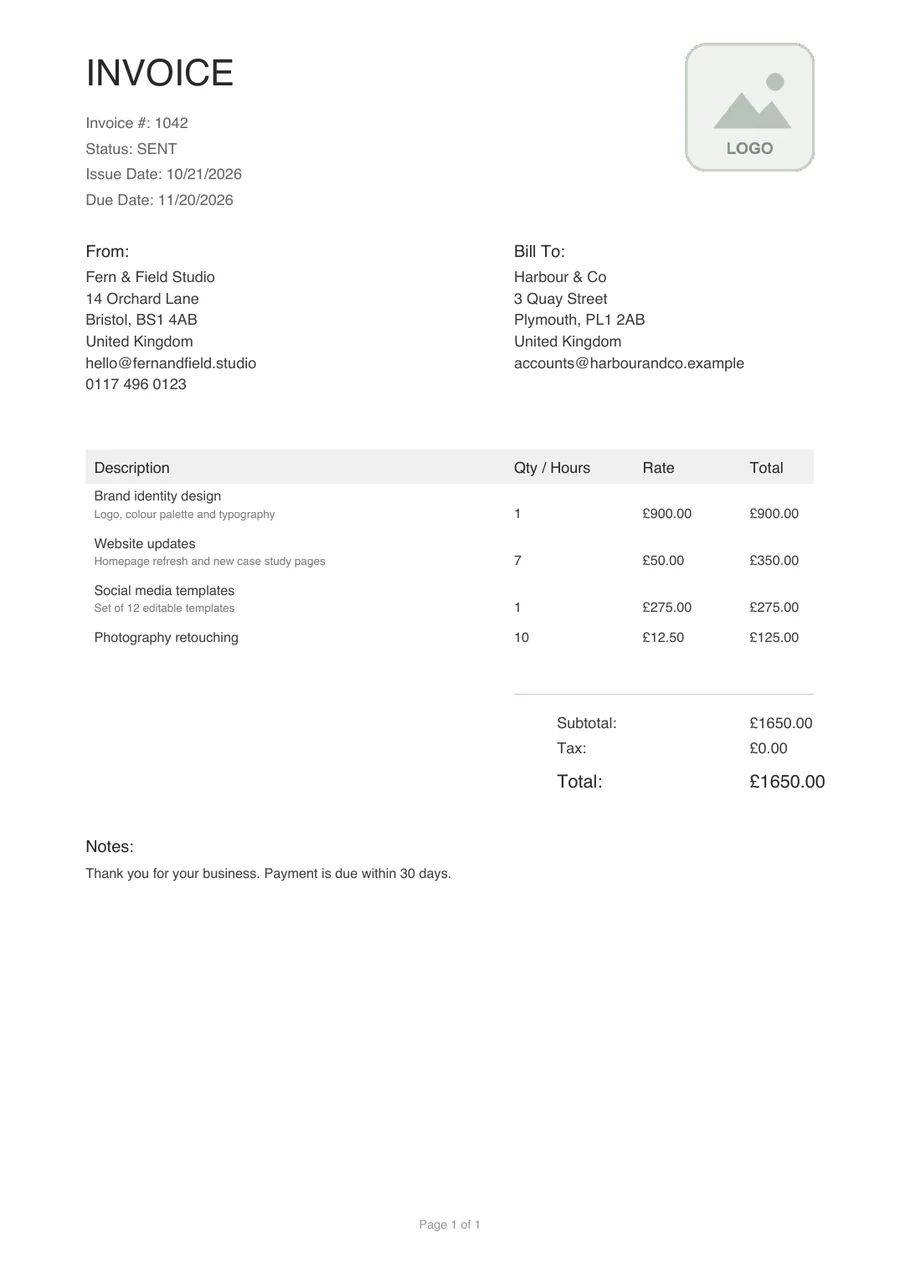
This is a real invoice exported from Next Invoice, with sample data. The numbers mark the parts a freelancer uses most.
- 1
Number, status and dates. The invoice number, its status (here SENT) and the issue and due dates sit together at the top.
- 2
From and Bill To. Your business details on one side and your client's on the other, from your saved business and client profiles.
- 3
Hours, days or units. A Qty / Hours column with a rate beside it, and a short description under each item.
- 4
Subtotal, tax and total. Worked out as you edit, with the total set larger than everything around it.
- 5
Notes. Room for your payment terms, such as the 30 days in this example.
From client to paid
- 01
Save the client
Keep a full profile, with invoice numbering options and a linked invoice history.
- 02
Add the work
Line items, section headers and flexible quantity labels, with live totals.
- 03
Preview and send
Download the PDF in a preset template or your own, and send it however you like.
- 04
Mark it paid
Set the status in one click once you have confirmed the payment.
What it does, and what it does not
Statuses are a record you keep. You stay in control of confirming payment and contacting your customer.
Next Invoice does
- Save client and business profiles
- Work out totals and tax as you edit
- Export a PDF with no watermark or footer
- Mark invoices Draft, Sent, Paid, Overdue or Cancelled, and show what is paid and outstanding
It does not
- Collect payments
- Send reminder emails or chase payment
- Replace accounting or tax software
On the Free plan
Unlimited clients
Each with their own numbering options and a linked invoice history.
Templates and builder
Three preset layouts and the template builder, with your logo and footer.
10 currencies
Bill in the currency your client pays in, with localised bank fields.
PDF downloads
Preview and download PDFs with no watermark or footer, also from your phone.
A free plan for occasional invoices
The Free plan includes 5 invoices and 5 proposals a month and 1 business, with every template, the template builder and PDF download included. Premium, with unlimited invoices, proposals and businesses, is coming soon.
Frequently asked questions
Related reading
Can I invoice for hours and fixed-price projects?
Yes. Add line items with flexible quantity and rate labels, such as hours, days or units, and group them under section headers.
Can I use my own branding?
Yes. Use your logo, custom styling and a template that suits your business.
Does Next Invoice replace accounting or tax software?
No. It is focused on creating and managing invoices. Check your separate bookkeeping, VAT and Making Tax Digital requirements.
How many invoices can I create for free?
The Free plan currently includes 5 invoices a month.